Indoor thermometer
- 4.6
- Rating
- 1.00M
- Installs
- Free
- Price
 Analysis by App-foxy
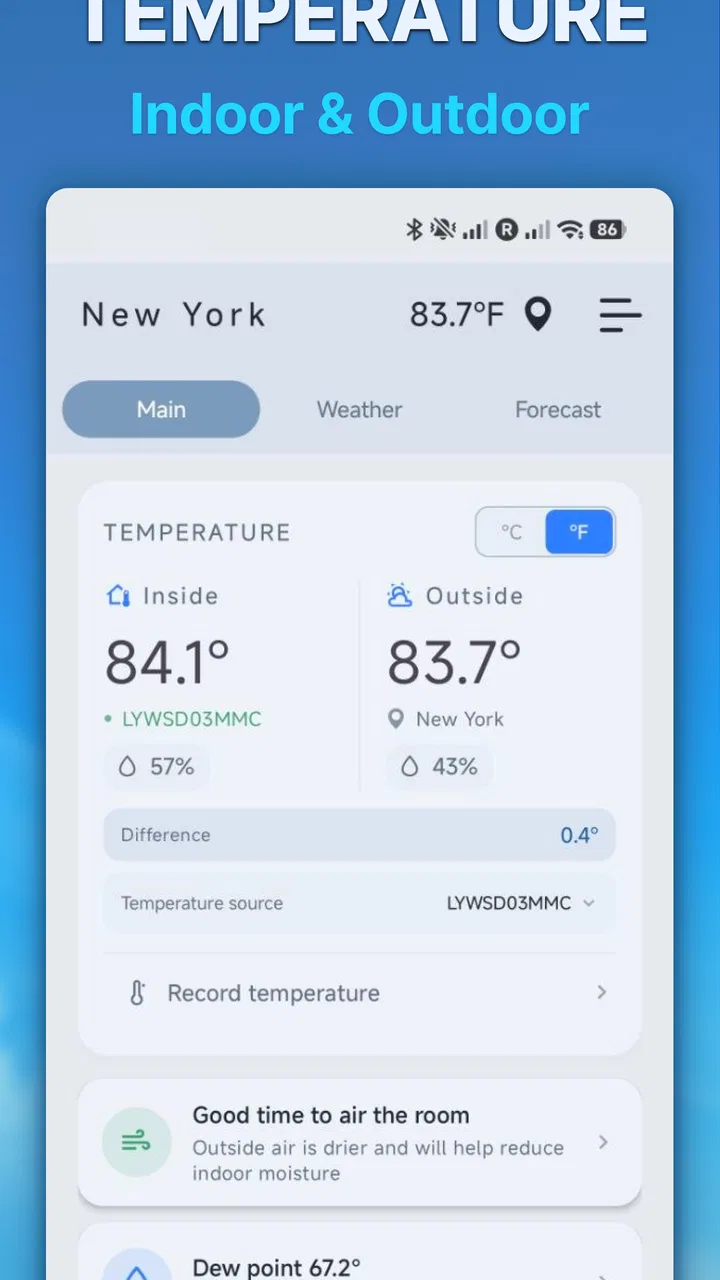
I like weather tools that answer one practical question quickly: how warm is it here right now? Indoor thermometer takes that narrow idea and keeps it simple, presenting itself as a weather app for checking indoor and outdoor temperature rather than trying to become a complete forecast platform. After using it, my impression is that its appeal comes from convenience. It is free, aimed at everyone, and easy to understand even if you only want a quick reading before opening a window, adjusting a heater, or deciding what to wear.
The app is developed by Sweetvrn and has built a sizeable audience, with over one million installs and a 4.6 average from around twenty-five thousand ratings. Those figures suggest that the straightforward approach works for many people. Still, I would not treat it as a replacement for a proper household thermometer or a full weather service in every situation. Its value depends heavily on what you expect from a phone-based temperature tool and how carefully you interpret the reading.
How the app feels in everyday use
The first thing I noticed is that the experience is centered on the temperature itself. That sounds obvious, but it makes a difference compared with weather apps filled with hourly charts, radar layers, alerts, pollen information, and long-range forecasts. If I only want to know whether the room feels unusually warm, or whether the outside temperature has dropped enough to justify a jacket, a focused screen can be more convenient than navigating through a crowded forecast.
You May Also Like

 Blood Strike: 2.5 Anniversary
Blood Strike’s Loadouts Turn Every Drop Into a Tactical Gamble
A close look at Blood Strike’s custom loadouts: how fast access to signature weapons reshapes its battle royale rhythm, rewards preparation, and narrows the gap between fights.

 Pandora - Music & Podcasts
Pandora’s Music Is Easy to Start, but Harder to Recover
Pandora’s strength is its low-effort path from a seed to a station. Its weak spot is how much confidence it asks you to place in connection, setup, and quiet recovery.

 8 Ball Pool
 Is Built on Rivalries, Rematches, and Routine
A close look at the rivalries, rematches, shared routines, and unanswered safety questions that turn a quick pool match into a persistent mobile community.

 Samsung Music
’s Quiet Strength Is Playing What You Already Own
Its reach comes less from spectacle than from dependable access to a personal library. That simplicity is both the app’s strongest retention engine and its ceiling.

 AccuWeather: Weather Radar
AccuWeather Review: A Quick, Clear Forecast for Everyday Decisions
For everyday plans, the best forecast is the one you can understand quickly. AccuWeather makes rain timing, radar, and local conditions easy to act on, with a few trade-offs.

 Hill Climb Racing
Why Hill Climb Racing Still Turns Crashes Into One More Run
A tiny car, a bumpy hill and one more upgrade: Hill Climb Racing keeps resurfacing because its simple chaos makes every near-miss feel personal.
More From Our News Desk



That simplicity also makes the app approachable for family members who do not enjoy complicated interfaces. The Everyone content rating fits the basic purpose: this is a practical utility rather than a social platform or entertainment product. I can imagine keeping it on a shared tablet, using it in a guest room, or recommending it to someone who wants a readable temperature check without learning a large weather dashboard.
There is an important distinction between an indoor thermometer app and a weather forecast app, though. A forecast service normally relies on a weather station or online weather source to describe conditions in a location. A phone does not automatically become a laboratory-grade thermometer just because an app displays a temperature. The phone’s hardware, its surroundings, and the way the app obtains information all affect how meaningful the result is. I therefore use this app as a convenient reference, not as equipment for sensitive decisions.
For a normal household routine, that distinction is manageable. I might check the reading before turning on a fan, compare it with how the room feels, and then make a comfortable adjustment. If I were monitoring a baby’s room, storing medicine, protecting musical instruments, or checking a greenhouse, I would use a dedicated sensor designed for that purpose. The best use of this app is quick awareness, not precision monitoring.
A realistic morning routine
One everyday scenario shows where it makes sense. Imagine waking up in a room that feels cooler than expected. Instead of guessing from the sensation alone, I can open the app, check the indoor temperature, and decide whether the difference is large enough to change the heating or simply put on another layer. Later, before leaving, I can look at the outdoor temperature and choose between a light jacket and warmer clothing.
That workflow is useful because it connects two decisions without requiring a full forecast. It is also less distracting than opening a general weather app and scrolling past information I do not need. The trade-off is that temperature alone does not tell me about rain, wind, humidity, or how conditions will change during the day. For a commute or outdoor activity, I would still check a broader weather source.
What the current version tells me about the product
The current version is 3.0.10, which places the app beyond an early experimental release. I see that as a sign that the basic concept has had time to settle, even though a version number by itself does not guarantee that every phone will behave identically. The app was released on July 13, 2021, so it has had a few years to establish its place as a lightweight temperature utility rather than a brand-new experiment.
From a user’s point of view, the most important effect of that maturity is predictability. I would rather have a small tool that stays focused than an app that keeps adding unrelated screens simply to appear more advanced. The current release appears best understood as an evolution of the same central idea: make temperature information accessible without demanding much effort from the user.
It also supports Android devices running version 6.0 or later. That is helpful for people using older hardware, especially if they want a basic utility without replacing a perfectly serviceable phone. At the same time, older devices can differ in sensors, performance, and system behavior, so I would judge the app after trying it on the actual phone rather than assuming that every handset will provide an identical experience.
How existing users may experience the evolution
If someone has used the app for a while, the move to version 3.0.10 is more relevant as a sign of continued maintenance than as a reason to expect a completely different product. The core promise remains easy to understand: check indoor and outdoor temperature from one place. Existing users who already appreciate that narrow focus are unlikely to feel lost by unnecessary complexity.
For a returning user, the practical question is whether the latest version continues to open quickly, display information clearly, and behave consistently on the device. Those are more important here than flashy additions. A temperature app earns its place through small repeated interactions, so even minor friction can become noticeable when I use it every morning or several times during the day.
New users should also keep expectations realistic. A mature version does not turn a phone into a dedicated environmental monitor. It can make temperature information easier to access, but it does not remove the physical limitations of the device or the uncertainty that can come from relying on a general-purpose phone. I would treat the updated app as a convenient layer of information, not as a calibration tool.
The useful trade-off between focus and completeness
Compared with a typical weather app, this tool’s strongest advantage is focus. Full weather applications are better when I need a forecast, precipitation timing, wind direction, severe-weather notifications, or a detailed view of the coming days. They are also usually better for planning travel or outdoor work because temperature is only one part of the decision.
Indoor thermometer is more attractive when the question is immediate and local: is the room warm, is the outside air cold, or has the temperature changed enough to affect my next small decision? The uncluttered purpose can make it faster to use, particularly for people who do not want to manage locations, forecast cards, and layers of weather information.
There is another comparison worth making: a physical thermometer. A wall-mounted or standalone digital thermometer can be the better choice when accuracy, continuous observation, or a fixed location matters. It can remain in a room and provide a stable reference without opening a phone. This app wins on portability and convenience, but a dedicated device wins when I need dependable environmental tracking.
That difference is not a flaw so much as a boundary. I would recommend the app to someone who wants a handy temperature check and already carries a compatible Android phone. I would point that person toward a physical sensor instead if the reading affects health, storage conditions, animal care, or any other situation where a rough indication is not enough.
Small habits that make the reading more useful
I found that interpretation matters as much as the number shown. If the phone has recently been in direct sunlight, inside a warm car, under a blanket, or near a heater, I would not immediately treat the indoor result as a trustworthy description of the whole room. I prefer to let the device sit in the room for a while and then compare the reading with the room’s actual feel. This is a simple habit, but it prevents a misleading moment from becoming a confident conclusion.
I also avoid placing too much weight on a single check. A better routine is to look for a pattern: is the room consistently warmer in the afternoon, does it cool quickly overnight, or does the outdoor temperature change noticeably before I leave? Repeated observations can help with comfort decisions even when the app is not intended to replace a calibrated instrument.
A third useful habit is to use the app alongside, rather than instead of, common sense. If the display suggests a comfortable temperature but the room feels humid, stuffy, or drafty, the temperature number does not tell the whole story. I would open a window, adjust ventilation, or consult a broader weather app when the situation calls for more context. The focused design is helpful precisely when I remember what it does not attempt to cover.
Who will appreciate it most
This app suits people who want a lightweight Android weather utility with a clear purpose. It is a good fit for someone checking a bedroom, office, workshop, or living area during the day. It can also work well for users with older Android phones because the minimum operating system is Android 6.0, making the app accessible beyond only recent devices.
I can also see it helping people who find large weather apps overwhelming. If all you want is a temperature reference, a specialized tool may feel calmer and quicker than a screen full of forecasts and warnings. The free price removes a major barrier to trying it, and the broad age rating makes it suitable for ordinary household use.
On the other hand, I would skip it if my main need were detailed forecasting. Someone planning a hike, checking storm risk, comparing several cities, or coordinating an outdoor event will probably be better served by a full weather service. I would also skip relying on it alone for professional or safety-sensitive monitoring. In those cases, the right alternative is a dedicated thermometer, a connected sensor, or a weather application with the specific information required.
Where the remaining gaps matter
The narrow scope is both the reason to install the app and the main limitation. Temperature is useful, but it cannot answer whether rain is approaching, whether wind will make the air feel colder, or whether humidity is making a room uncomfortable. A user who expects one app to explain the entire day’s conditions may find the experience too limited.
There is also a practical gap between a displayed temperature and a measurement I would trust for important decisions. Phones are designed for communication and computing, not necessarily for precise environmental sensing. Even when the result looks plausible, I would not assume that it has the same reliability as a thermometer placed correctly in the room. This is the point where a simple app should be complemented by hardware, not pushed beyond its role.
Another consideration is that a focused app may feel almost too basic for people who want history or deeper analysis. If I wanted to study temperature changes over several days, compare indoor and outdoor conditions systematically, or automate heating decisions, I would look for a tool built around logging and sensors. This app is more suitable for immediate checks than for turning a room into a measured research project.
What I would watch in future updates
Because the app has reached version 3.0.10, I would like future development to preserve its quick, uncomplicated character. Any improvement should make the temperature check more dependable or easier to interpret rather than burying it under unrelated weather features. Clear explanations about how to get a more representative indoor reading would be especially valuable for people who assume the phone itself is always measuring the room directly.
I would also watch how the app continues to serve users on older Android devices while remaining comfortable on newer phones. Compatibility matters for a utility that people may install on a spare or older handset and leave available for occasional checks. A smooth launch and readable presentation are more important to me here than visual novelty.
For existing users, the main thing to watch is whether updates continue to improve stability without changing the simple workflow that made the app useful. For new users, I would judge it after a few ordinary checks in different parts of the home, not after one reading taken immediately after handling the phone. That short trial gives a more honest sense of whether the app fits the way you actually make temperature-related decisions.
My recommendation after using it
I see Indoor thermometer as a practical, narrowly focused app rather than a complete weather solution. Sweetvrn has built something that is easy to approach, free to try, and suitable for everyday temperature awareness. Its 4.6 average and large install base reinforce the impression that many users value that simplicity.
My recommendation is straightforward: install it if you want a quick indoor and outdoor temperature reference on an Android phone and understand that convenience is not the same as laboratory accuracy. Use it for room comfort, clothing decisions, and casual checks. Pair it with a proper weather service when you need forecasts, and choose a dedicated thermometer when the reading has health, storage, animal-care, or professional consequences.
That balance is what makes the app worthwhile. It does not need to replace every other weather tool. It only needs to make a small recurring task easier, and for that specific job, its focused design is more useful than a crowded alternative.
FAQs for Indoor thermometer
01How accurate is the Indoor Thermometer app?
The accuracy of the Indoor Thermometer app largely depends on the sensors of your smartphone. Many modern devices offer fairly reliable readings, but it’s important to note that the app’s accuracy can vary based on the hardware. Consider using it alongside a physical thermometer for best results.
02Does the Indoor Thermometer app require an internet connection?
No, the Indoor Thermometer app typically does not require an internet connection to function. It uses your device’s internal sensors to measure temperature. However, some features, like data logging or enhanced analytics, might require an internet connection for updates or additional functionality.
03Is the Indoor Thermometer app compatible with all devices?
While the Indoor Thermometer app is designed to work on most modern Android and iOS devices, compatibility can vary. Older smartphones may lack the necessary sensors or may not support the latest app updates. It's recommended to check the app’s requirements in the app store before downloading.
04Can the Indoor Thermometer app measure outdoor temperature?
The Indoor Thermometer app is primarily designed for indoor use, relying on your device’s sensors. For outdoor temperature readings, it would need to pull data from an online weather service. Check if the app offers this feature, as it might require an internet connection.
05What are the privacy implications of using the Indoor Thermometer app?
The Indoor Thermometer app generally requires minimal permissions, focusing mainly on sensor data. However, if it requests additional permissions, such as location or internet access, review the app’s privacy policy to understand how your data is used and ensure your privacy is maintained.
Pros
- Accurate temperature readings.
- User-friendly interface.
- Quick data refresh rate.
- Supports multiple locations.
- Customizable alerts.
Cons
- Requires internet for updates.
- Ads can be intrusive.
- Limited free features.
- Battery consumption is high.
- No widget support.

Indoor thermometer
Gallery